How to Write a Retreat Sales Page | Book Wellness Retreats
How to Write a Retreat Sales Page
Your retreat sales page should give people what they need to decide whether to join - and a clear way to book. Put the dates, location, experience, room options, and payment details in one place so guests can move forward without chasing answers in messages.
Ads, directory listings, and emails all land somewhere. That somewhere works best when it answers the practical questions and lets someone reserve a spot. If the look and feel of the week still feel unclear, How to Brand a Retreat covers edge, one-liner, and kit. If you are still defining who the retreat is for, How to Start a Retreat with Purpose comes first, and the schedule and budget live in How to Plan a Retreat. What follows assumes you already know the retreat. Now you need a page that can take a booking without sending someone on a scavenger hunt.
Start with a Clear Hero
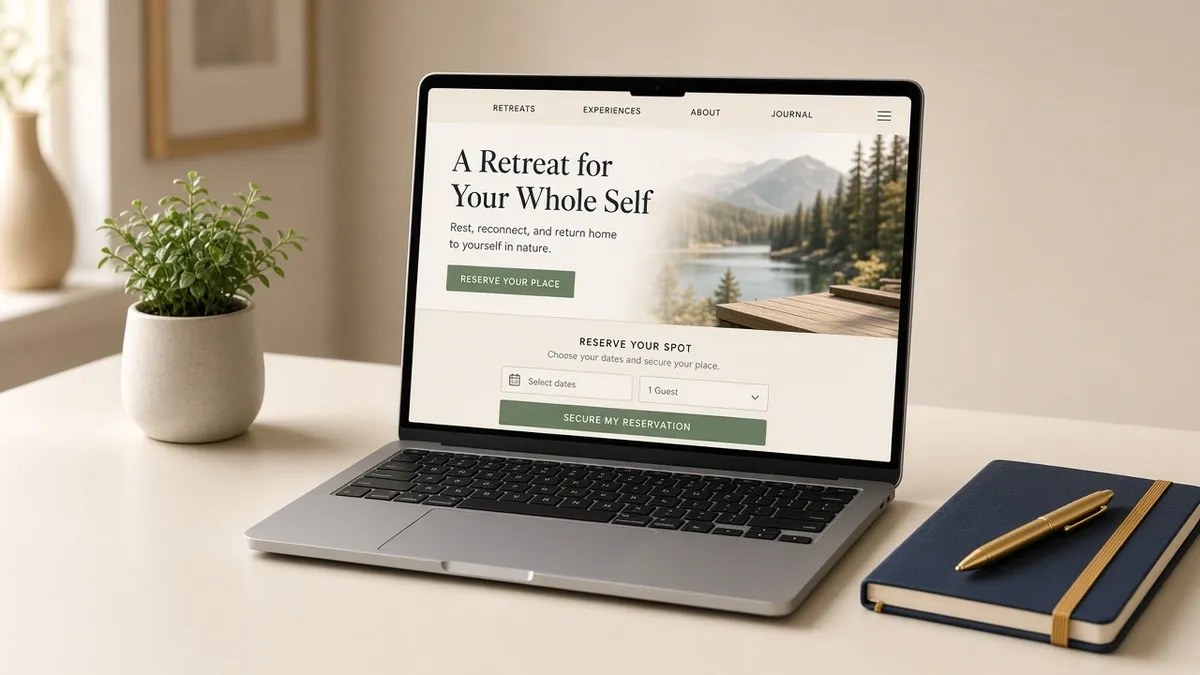
Open with the facts someone needs when they read the page on a phone. Name the retreat. Say where and when. Name who it is for and what they get. Put one clear call to action next to that block. If those pieces are missing, guests may still be unsure what you are offering no matter how polished the rest of the page looks.
Keep the layout clean and mobile-friendly. Most people will meet you on a small screen first. High-quality photos of the week help them picture themselves there: venue, rooms, food, activities, and the natural surroundings you actually host in. Faces and in-between moments usually do more work than empty rooms alone.
A short promo video is optional. A one-minute piece that introduces you and the week can build trust when it is honest and well made. It is not required for a page to work. Clarity in the hero comes first. Video is a support, not the whole strategy.
Write the hero like a friend summarizing the offer out loud. If it takes a paragraph to name the retreat, the copy is still too long. Cut adjectives that do not change the picture. Keep the promise the same as your one-liner elsewhere so guests are not re-deciding whether they landed in the right place.
Choose One Primary Booking Action
Calls to action turn interest into a next step. Choose one primary booking action and repeat that same button where it is useful down the page. Supporting links to policies, FAQs, or room details are fine. What you want to avoid is six different primary buttons that each mean something different.
Labeled examples that tend to work: Check Availability, Reserve My Spot, or View Room Options. Match the button label to the actual next step. Clear beats clever. Guests should not have to decode what happens when they tap.
Check Availability is often a good fit when someone wants to move forward without paying on the spot. Reserve My Spot fits when inventory and dates are locked and you want a direct path to rooms. View Room Options helps when tiers matter and people need to compare before committing. Choose the one that matches how ready your audience usually is, then keep the repeats consistent.
Make the primary button visible. A sticky CTA that stays in view while scrolling can help on long pages, as long as it does not cover the content people came to read. Wherever that primary button appears, it should lead to the same next step: room options and checkout, or a short availability check that still ends in booking and payment.
Make Booking and Payment Clear
Once someone clicks, booking and payment should be easy to follow. Show clear prices, send receipts, track deposits and installments when your setup supports them, and keep terms where guests can find them. Guests are often sending a large deposit to someone they may have only met online, so clarity matters.
Use a retreat booking platform, or a payment processor connected to your booking system, so deposits, guest records, and payment status stay in one place. Tools like WeTravel or Stripe are examples of that category, not the only options and not a partner pitch. Pick a setup you can actually operate when several people book in one evening.
If your chosen setup supports installments and a pay-in-full path, offer both. Automatic reminders and card retries help when the platform includes them. Show the exact name that will appear on bank statements so guests are not surprised later. Keep refund, transfer, and deadline terms easy to find next to the price, not buried in a PDF three clicks away. Quote in one currency, or spell out the conversion method and any fees before anyone pays.
Deposit language and installment math belong with How to Price a Retreat. The sales page's job is to present those terms clearly before guests book. Hidden fees at checkout create the same problems as a muddy refund policy. If airport transfers, tourism tax, or a single-occupancy supplement exist, put them next to the rate before a card is charged.
Peer-to-peer payment apps can work for small transfers between people who already know each other. For many retreat deposits, a booking and payment system with receipts and tracking is usually easier for guests to trust. The point is clarity and records, not the look of a brand name alone.
Answer the Hesitation on the Page
Guests book when they feel informed and confident. Treat the page as a conversation. Answer the questions you already field in messages so hesitation shrinks before checkout.
Include a clear breakdown of what is included and what is not. Travel basics help as tips: nearest airport, visa notes as orientation, and a reminder that travel insurance is worth looking into for their situation. That is not legal advice. It is the practical map people ask for before they rearrange their calendar.
Spell out deposit amounts, payment deadlines, and refund or transfer terms in plain language. Put facilitator bio and a real headshot where people can find them. Add guest testimonials and past retreat photos when you have them, plus any certifications that matter for the work you lead. Proof should feel like evidence of retreats you actually hosted, not a stack of vague praise.
Keep the tone conversational. A dump of every policy paragraph at once reads like a brochure nobody finishes. Short blocks, honest answers, and the same story you tell on a call will do more. When policies need a deeper home, Legal Essentials for Hosting a Retreat covers the categories leaders usually sort with local advice. On the offer page, guests need the guest-facing version they can understand without a lawyer in the room.
If the same hard question keeps showing up in messages, add it to the FAQ. Consistency protects you as much as the written policy does.
A Simple 1-9 Layout
You do not need a novel structure. A working map for a retreat sales page looks like this:
1. Hero - retreat name, location, dates, who it is for, and one CTA
2. Overview - the promise of the week in plain language
3. Optional video - short intro if you have one that helps trust
4. Venue - gallery and a short description of where people will sleep and gather
5. Inclusions - what is in, what is out, and any upgrades
6. Facilitator - headshot and a bio that points back to the guest
7. Proof - testimonials, past photos, certifications when relevant
8. FAQ / travel / payment - the guest questions in one place
9. Booking + checkout - room options and a clear payment flow
Use that order as a checklist, not as a rigid template you cannot rearrange. Some retreats need the venue earlier. Some need the facilitator closer to the hero. What matters is that each section earns its place and the primary booking action stays familiar the whole way down.
When you draft, write for mobile first, then check desktop. Long walls of text that look fine on a laptop often collapse into an endless scroll on a phone. Break sections so a guest can find inclusions, dates, and payment without hunting.
Title and Meta for Your Offer Page
Even a temporary program page deserves basic hygiene. Use the retreat name, location, and dates where they help a guest recognize the offer. Write a clear page title and an accurate meta description that matches what the page actually sells. Use natural image alt text that describes the photo.
Avoid irrelevant keywords that do not describe your retreat. Clear titles and alts help sharing and accessibility. They are not a promise that SEO will fill the room on its own.
Keep the title aligned with the hero. If the H1 and the browser tab describe different retreats, guests may wonder whether they are on the right page before anyone reads the inclusions.
What to Do Next
Build the hero, choose one primary booking action, answer the guest questions, and make booking and payment clear. If you want the full planning, hosting, and offer work in one place, including the landing-page chapter this article draws from, get the free retreat planning guide. Lead capture and nurture come later in that guide; start with a page people can actually book from.
If you would rather walk through hero, guest questions, and checkout with someone who has seen both the leader side and the venue side, book a discovery call. We are happy to think it through with you.